

I recently spent an intensive testing period with Acebott‘s STEM education kits — filming, assembling and stress-testing three of their products: the Motion-Sensing Glove, the Bionic Biped Coding Robot and the Robotic Arm. Here’s what stood out. (Disclosure: this was a product-testing collaboration; the kits were provided by Acebott. All observations are my own.)
The kits
- Motion-Sensing Glove Kit — wearable gesture controller
- Bionic Biped Coding Robot Kit — a walking two-legged robot
- Robotic Arm Kit — desktop multi-axis manipulator
What makes the glove special
Gesture-based control is still rare in the STEM education market, and Acebott’s glove nails the intuitive part: students see their hand movements — closing a grip, raising an arm, rotating a wrist — directly drive a robot arm or vehicle in real time. It moves robotics from “program, then watch” to “your body is the controller”, which is exactly the kind of embodied interaction that hooks younger students. In my sessions it consistently produced the “whoa” moment that makes abstract motion-control concepts click.
Solid learning support underneath
Two things impressed me beyond the hardware:
- Genuinely well-commented sample code. The example programs come with clear, detailed annotations — rare in this segment, and it keeps students from hitting a wall of unreadable code when their curiosity is highest.
- A one-stop companion app covering the full journey: guided assembly steps, block coding, connection and live control. The interface is clean and the flow lowers the entry barrier for classrooms with mixed abilities.
The arm and the biped
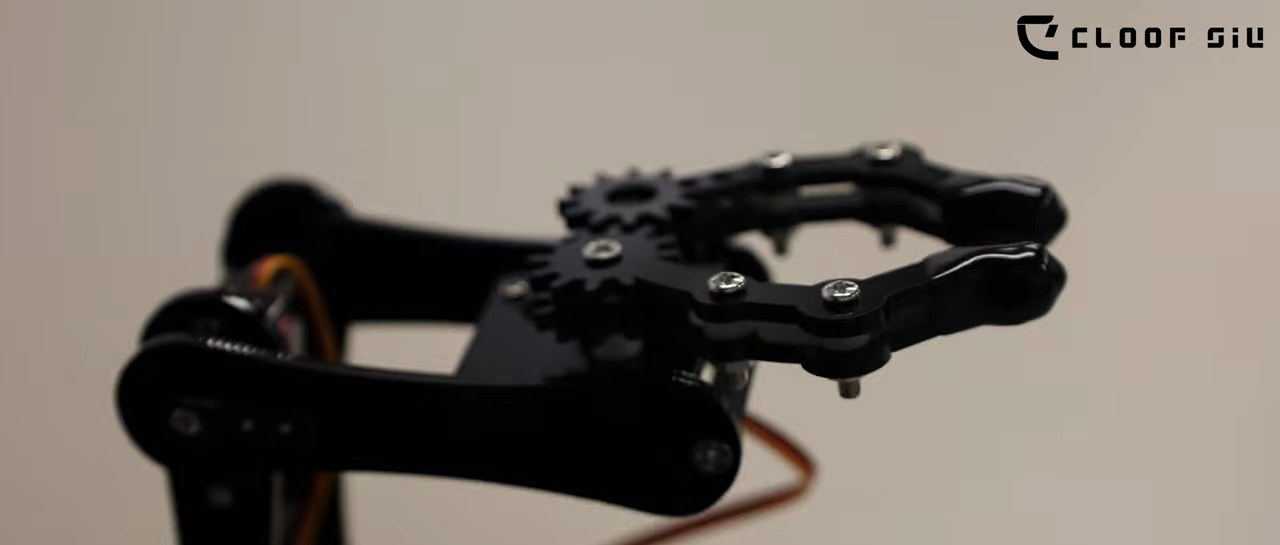
The gripper opens to 260° — one of the stand-out details during testing. From my robot arm test video.
The biped robot walks and balances well enough to demo immediately after assembly, and the arm’s modular gripper gives students something tangible to program around — grabbing, sorting, and little pick-and-place challenges are easy to set up. If you want to see them in action:
- Watch the biped robot test
- Watch the robotic arm test
- More STEM education highlights at LTE Learning & Teaching Expo 2026
Honest hands-on notes
No review of mine would be complete without the practical stuff. Two observations from real assembly and use:
- Comfort: the glove fits snugly but its inner edges could use a soft lining — longer sessions would feel friendlier with it.
- Assembly friction: the acrylic structural panels are quickest to defeat an impatient builder; a little extra tolerance in the panel fixings (or printed structural parts) would help younger students a lot.
Verdict
Acebott’s kits show how far STEM hardware has come: gesture control that actually works, thorough support materials, and an app that students genuinely engage with. With a few comfort and durability refinements, these are strong classroom contenders. If you’re looking for an entry point that makes human-robot interaction tangible for beginners, the motion-sensing glove ecosystem is worth a serious look.
— Cloof Siu · robotics educator